

Page speed is more complex than it looks. While you might think that this concept speaks to the health of your website, there are so many more moving pieces that determine why your website is fast or slow. Some of these metrics can really help you identify problems, while others are vanity metrics meant to make your site look fast.
We are going to look at two primary sources for page speed data: Google Analytics and Google PageSpeed Insights, along with a few other metrics, to show you how to effectively audit your pages to improve your overall speed.
Metrics in Google Analytics
Google Analytics is a good place to start for beginners. If you have never tracked your site speed before, you can follow these metrics to get an idea for the rises and falls in your site performance. You can find these data points the Google Analytics path: Behavior > Site Speed > Overview.
Page Load Time
Page Load Time measures how long it takes a page to fully load. However, most web users will see valuable information before this load time is complete. As we saw in last month’s post about progessive web images, the content can render in a few milliseconds, but then take another second or so to be fully loaded and clear. There are a lot more metrics that speak to the speed of your website and its SEO value.
Page Timings
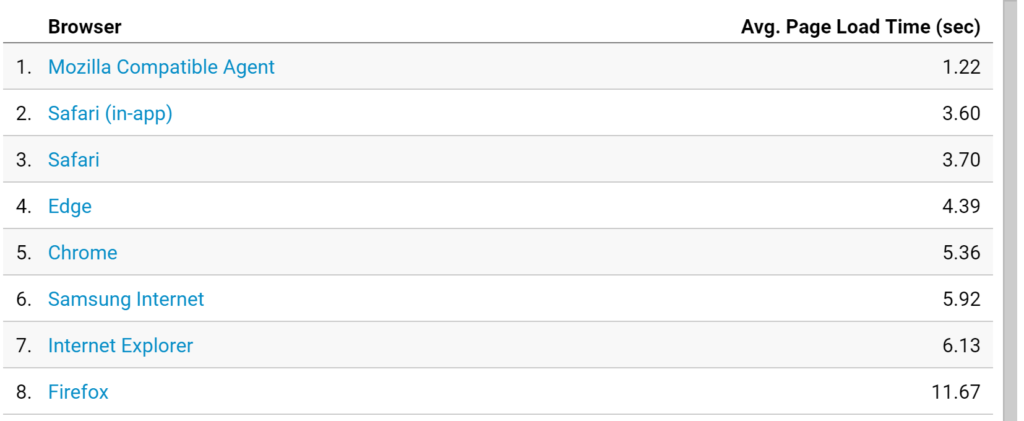
The Page Timings report allows admins to see the average load times for individual pages. For example, if you have a few graphics-heavy pages, these might load slower.
You can also see the distribution of the percent of pages that fall into different speed buckets (aka what percent of pages are slow and need work).
The Page Timings list really only tells you which pages are slow. They don’t go into detail to explain why they are. However, Google does have a Speed Suggestions tab in Analytics that you can refer to with improvements.
Also, if you want to determine which slow pages to prioritize, you can compare Page Timings with the results of your search rankings tool to see which pages could most benefit from improvements. Improving site speed on a few key pages could boost your traffic significantly.
Checking metrics like Page Load Time and Page Timings is kind of like a doctor checking a heartbeat on a patient. The heartbeat can give you an idea for the overall health of a person, but the doctor needs additional information before they can give a diagnosis. For our diagnosis on page speed, we need to dig a little deeper.
Google PageSpeed Insights
If Google Analytics tells you when there is something wrong with your page speed, then Google PageSpeed Insights provides context for which parts of your website are struggling. This tool gives you an overall score (from 0-100 where 100 is the best) for both mobile and desktop pages. It then breaks down your performance into various metrics and provides opportunities and diagnostics for maximum change.
For example, here are the results of Trinity Insight’s website analysis:
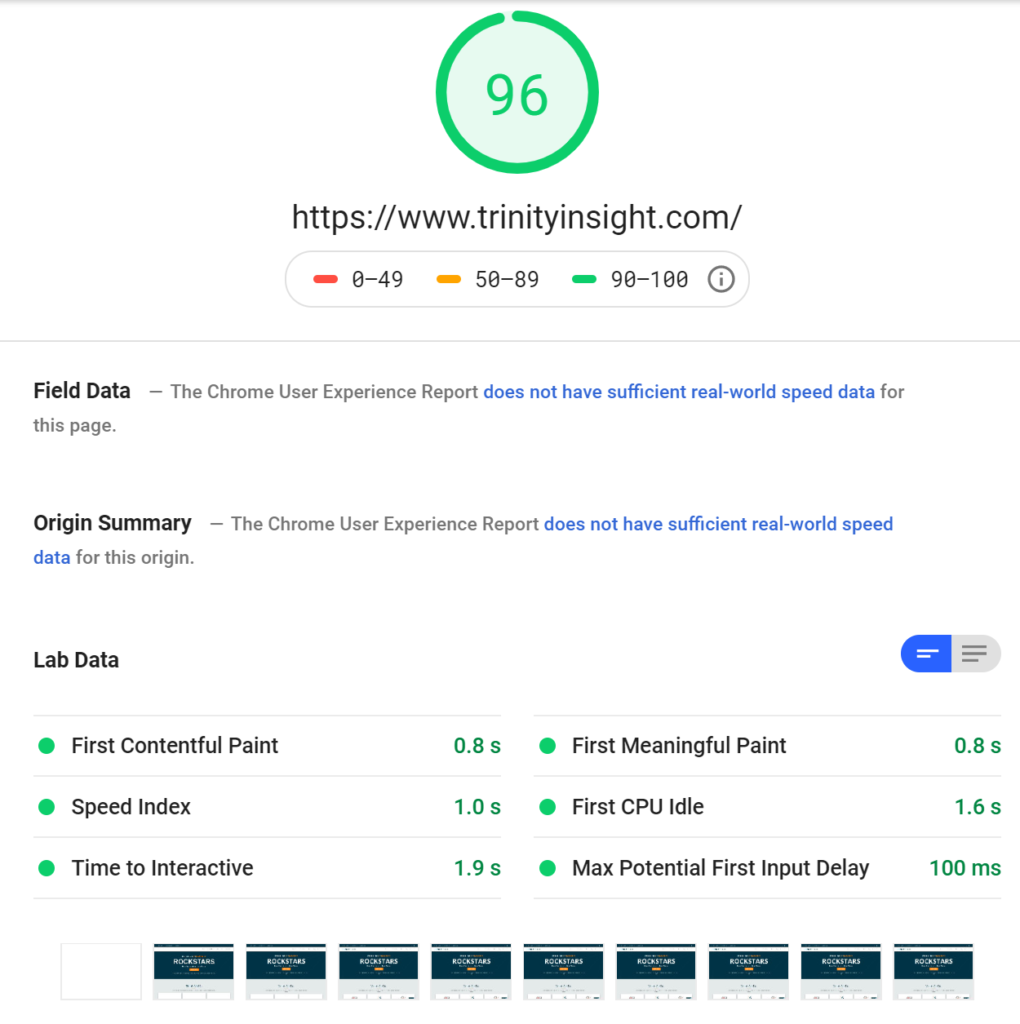
Below is a clear breakdown of these metrics, so you can see how they affect not only your page speed and SEO but also your overall user experience.
First Paint (Contentful and Meaningful)
First Paint (FP) refers to the first time anything is rendered on your browser. Oftentimes this is a header image or simply a background color on the page. FP is a vanity metric. These backgrounds and colors can trigger immediately, making you think that your speed is fast. However, your user is still sitting there waiting for your page to actually load. Improving FP might have a nominal effect on your bounce rate, but nothing substantial.
If you dig a little deeper into the FP metrics, you will come across FCP, or First Contentful Paint. This refers to the first viable content on your website (in the form of text, images, etc.). Essentially, FCP is the first time something shows up that your audience can actually use or gain information from.
However, there is an additional level above that. First Meaningful Paint (FMP) was coined by Google and refers to the time it takes for the primary content to load on the page – or the time it takes to load the content that users arrived on your website to see. No matter how impressive your website is, no one came there just to see your background and navigation toolbar. This is why FCP and FMP are separate, but next to each other in Google’s Pagespeed Insights.
Speed Index
Google defines Speed Index as “how quickly the contents of a page are visibly populated.” The search giant encourages users to optimize their pages so they load faster. This includes using less bulky images and simplifying code. Like the other metrics in this list, the lower the number, the better.
Time to Interactive
The Time to Interactive (TTI) metric takes FCP and FMP to the next level. Google defines interactivity in three steps:
- The page has displayed useful content (has passed the FCP).
- Event handlers are registered for most visible page elements.
- The page responds to user interactions within 50 milliseconds.
This means that your user is able to navigate your page and the information presented without problems. It was previously called Consistently Interactive. For example, if an alcohol brand loads its site with a gatekeeping form to submit your birthday and confirm that you are older than 21, the TTI is the amount it takes for you to be able to click on the fields and submit the information.
TTI and FMP are not as closely tied as you might think. “Some sites optimize content visibility at the expense of interactivity,” the developers at Google write. This creates a bad user experience as people are left trying to click and interact with the site to no avail as it continues to load.
First CPU Idle
The datapoint First CPU Idle and TTI are closely correlated. It refers to the amount of time it takes for your page to be minimally interactive. The idea is that most, if not all, elements on the page should be useful to the user, so they can start engaging with your content even if it isn’t fully loaded.
Like FP versus FCP, First CPU Idle is typically faster than TTI.
Max Potential First Input Delay
First Input Delay (FID) refers to the time from when a user first interacts with your website to the time when the browser is able to respond to the reaction.
For example, if you click a link on Facebook or Google, do you just sit there waiting for your page to load? This is because the browser is too busy (typically handling other elements of your app) to load the page.
Philip Walton, an engineer at Google, does a good job of explaining FID and how it basically serves as the first impression for users. Your users aren’t going to give your slow page time to load.
With this data, you can pinpoint where your pages are slowing down, from the first load to last interactive elements on your page.
Additional Data Points That Matter
As you can see, not all of these page speed metrics matter. Your Page Load Time is interesting from a high-level view but doesn’t provide concrete information on what is going wrong. Additionally, other metrics, like FCP, affect your bounce rate, but might not directly affect your SEO. Below are a few additional metrics to keep an eye on for your page speed that will affect your search and user experience.
Time to First Byte
We recently discussed Time to First Byte (TTFB) on the Trinity Insight blog. It is defined as the time it takes to request information from the server and send the information that was requested. Google places a significant amount of value in TTFB for speed rankings. If you can improve this metric, you can improve your search rankings.
Number of HTTP Requests
The Number of HTTP Requests refers to the amount of files a page has to request in order to fully load. As a page loads, it sends HTTP requests to the server. These requests basically ask for information for the webpage. Each file requires its own requests, and each request needs to be made sequentially. This means that the more files and content that you need to pull, the more HTTP requests you need to send.
The fewer the HTTP requests, the sooner your page will be able to load all of the way, improving metrics like your FMP, TTI, and FID.
Improve Your Page Speed With Trinity Insight
Something that seems simple at first, like improving page speed, can quickly become more complex when you realize all of the data points that you are dealing with. Identifying exactly why your website is slow is complex, as there are multiple factors that influence the operations of your website. That is why you don’t have to manage it alone.
Trinity Insight specializes in SEO and user experience improvements from a technical perspective. We can review your site speed and recommend concrete improvements. Take advantage of our Free SEO Audit today to learn more about your website’s opportunities and challenges for improvement.